Life of a work order
From schedule board to archive — one record that travels with the crew as a .msworkorder file.
Work order lifecycle
Tap any step for the expanded definition
Status path: Created (new assignment) → Pending (in progress on site) → Complete (docs satisfied) → Archived (office cleanup). Estimate-only jobs skip field completion gates; insurance and service jobs use arrival, photo, and progress requirements.
Office / manager Field / contractor Portable file handoff
Work order creation — two business stories
Same app, different scale. The work order is the story container either way.
Solo operator (you are the firm)
A customer calls about a AC that will not cool. You create a work order on the phone while still on site of the previous job: type = service call, site / property name, address / unit, appointment, problem note by dictation. You are assignee and manager. There is no handoff file — you work the job yourself: I’m here, photos, progress, parts line for the pump, Leaving, Mark complete, optional PDF for the owner. Archive when paid. One person, full paper trail, no cloud account.
Larger organization (office + field crew)
Dispatch on iPad fills Schedule: who (contractor name + phone), what (site / equipment + title), where/when (address, unit, half-hour appointment).
Save with Share work order after save → Messages or AirDrop the .msworkorder package.
Field tech imports on iPhone, runs the documentation workflow, then returns a field package at end of day.
Office merges by job id, reviews the timeline, exports PDF for insurer or customer, archives when closed.
Managers see who arrived late, who took photos, and who ghosted — without a proprietary chat network.
Delegating a ticket to a contractor (trial hire)
Marketing deep-dive: Try a contractor before you hire them — workflow enforcement as a candidate vs fail vetting process so you avoid hiring or retaining unproductive employees.
Treat the free tier as a vetting process, not just software. A potential contractor downloads ServiceTech for free, receives one real ticket with clear instructions, and either runs the workflow honestly — or does not. Documentation score + gates make the outcome objective: candidate or fail. You learn how they communicate before payroll — and can stop retaining people who will not follow process.
Contractor trial · free app · one ticket
Tap steps for the full story
The test is simple: Can they show up on time (or say why), clock in, follow the workflow, document with photos and spoken notes, and communicate honestly through the app as designed? If they cannot complete a phone workflow, they will not protect your firm’s reputation on site.
| Signal | What it suggests |
|---|---|
| On-time I’m here + clear photos | Reliable field habits; ready for more tickets |
| Delay / Blocked used with honest notes | Professional communication under friction |
| No arrival stamp, no photos, vague texts only | High risk of ghosting customers — pass |
| Returns package same day | Understands the office needs a paper trail |
| Argues with gates / skips docs | Will fight process on every insurance job |
Data handoff to contractors
No cloud login and no proprietary chat network — the file is the interface. Managers still text a short note if they want; the authoritative assignment is the package.
Manager ↔ contractor data handoff
Tap nodes for definitions
Manager (iPad / Mac)
Contractor / employee (iPhone)
What travels in the package: work order identity and type, assignment (who/what/where/when), site / equipment fields, diagnostics (problem → identification → testing → action → handoff),
progress log with timestamps and authors, photos when included, parts/labor lines, and optional linked survey snippets.
Format: JSON, extension msworkorder, UTI com.grego.servicetech.workorder.
End-to-end sequence (text)
Not automatic SMS parsing of free text — the attachment file is the structured interface (same idea as portable transfer records in sibling products).
1. Manager assigns work (iPad / Mac)
- Open Schedule (or Jobs → +).
- Assign → choose work order type (service, insurance, deposit, cancel, referral, handoff, abandoned, survey, …).
- Fill Who (employee/contractor + phone), What (boat, title), Where/When (address, unit, appointment).
- Save. Optionally enable Share work order after save.
- System share sheet: Messages (text the file), Mail, AirDrop, or Files.
Caption text explains: open the .msworkorder attachment in ServiceTech.
2. Worker receives assignment (iPhone)
This path is the core of the contractor trial marketing page — can they follow instructions on a real job?
- Tap the attachment in Messages / Mail / Files.
- Open in ServiceTech (document type registered).
- Or: Transfer → Import work order file.
- Job appears in Jobs → Created (or updates if same id).
- I’m here (or Start job) → logs arrival with timestamp.
- During the day: Progress / Photo+ / Delay / Blocked one-tap log entries (note + photo).
- Documentation score and blockers prevent Mark complete until minimum docs exist.
- Leaving → then complete; add cost lines as needed.
3. Worker returns end-of-day package
- Transfer tab → select completed or in-progress jobs.
- Enable Package as worker field return.
- Share field return → Messages / AirDrop / Mail to the manager.
- Manager imports the same way; diagnostics, status, and ledger merge into the firm queue.
4. Insurance claim job
- Type = Insurance claim.
- Enter claim #, document Problem / Identification / Testing with photos.
- Add Parts and Labor cost lines for estimate support.
- Complete + handoff notes for adjuster or yard.
- Optionally create linked Survey type Insurance Claim / Damage.
5. Estimate only (preliminary examination)
- Work order type = Estimate only.
- On the job: Estimate examination
- Customer objective — what they want from the quote / visit (dictation OK).
- Preliminary examination — record the site / equipment problem; camera required for problem photos (live field evidence).
- Add findings: Damage, Scope creep, Should do while here (each can take a camera photo).
- Add labor/parts cost lines for the quote.
- Export PDF — estimate examination section is included.
Photo logging (Progress → Photo update) also requires the camera. Other progress notes allow one button for Take photo or Photo library.
6. Deposit / cancellation / referral / abandoned
| Workflow | Key steps |
|---|---|
| Deposit | Type Deposit/hold; record deposit amount; scope in problem statement |
| Cancellation | Type Cancellation or use Cancellation workflow on job; reason required |
| Referral | Type Referral; partner name; what was shared in handoff notes |
| Handoff | Type Yard handoff; open items in handoff notes; archive after accept |
| Abandoned | Mark abandoned or type Abandoned; last status + recovery options |
7. Site survey
- Surveys → + → choose type and In/Out of water.
- Header: site / equipment, parties, insurer/claim if claim-focused.
- Walk subsystem steps; rate and dictate notes; mark complete.
- Fill findings, recommendations; keep limitations text.
- Progress bar shows completion fraction.
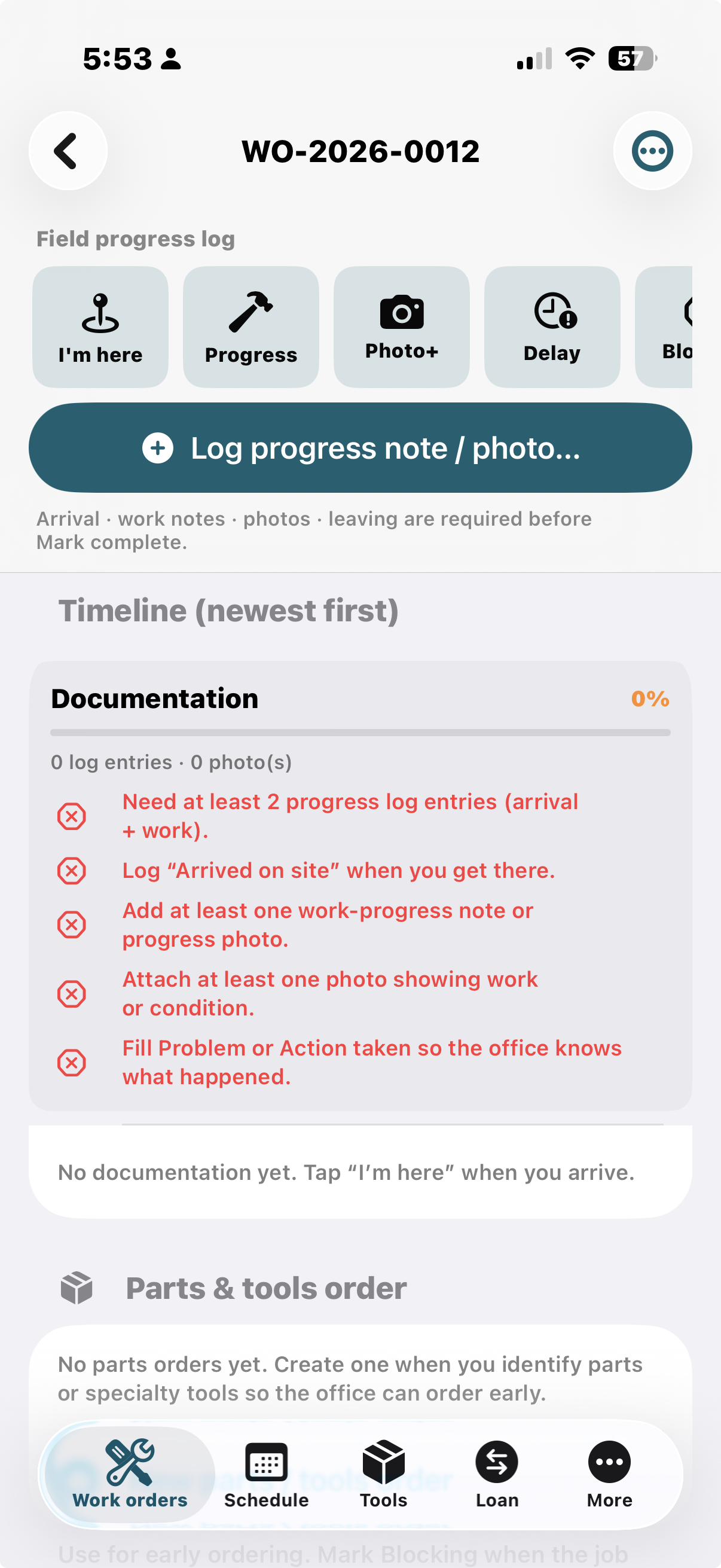
8. Field documentation (anti-ghosting)
Designed for contractors who show up late and leave no paper trail — and for the trial hire test above.
| Action | What it records |
|---|---|
| I’m here | Arrival time + optional note; starts job if needed |
| Progress | What you did + optional photo + % complete |
| Photo+ | Required photo with caption |
| Delay | Why late / waiting |
| Blocked | Waiting on parts/customer/yard |
| Leaving | Departure stamp |
| Mark complete | Blocked until: arrival, progress/photo, ≥1 photo, leave/complete note, problem or action taken |
Managers can Force complete with confirmation (stamped in the log).
Timeline shows newest-first with author name and timestamps — travels in .msworkorder field returns.
9. Export work order PDF (customer / office)
- More → Firm & tech profile — set firm name, address, phone, email, tech name (letterhead).
- Open the job → PDF export.
- Optionally toggle Include photos.
- Export work order PDF… → share via Mail, AirDrop, Files, print.
PDF includes: company header, work order # / type, assignment (who/where/when), boat, diagnostics, cost totals, progress log (with photos if enabled).
10. Tools on the truck
- Tools → add locations if needed.
- Add tools with qty and location (van/shop).
- No demo data on first launch.
11. Loan / Borrow (remember handoffs)
Not a work order — a memory ledger for gear and consumables that move between people. Open the main Loan tab. Full guide: Loan / Borrow docs.
- Tap Record Loan / Borrow.
- Choose Loaned Out or Borrowed.
- Enter item description and person; optional notes, photo, reminder.
- Save. Later: swipe Mark Returned.
Example — remember the tarp
| Field | Value |
|---|---|
| Type | Loaned Out |
| Item | 3 rolls of plastic tarp |
| Loaned to | Tony Soprano |
| Notes | Winter cover staging; asked for them back after the weekend |
Footnote: Probably not gonna get this back.. Record it anyway — the ledger is for your memory, even when return odds are theatrical.