ServiceTech / ServiceValet turn the free tier into a vetting process. Send one real site ticket. Documentation gates force the worker to follow instructions. You decide candidate or fail from evidence — not interviews.
Workflow enforcement is the vetting UI
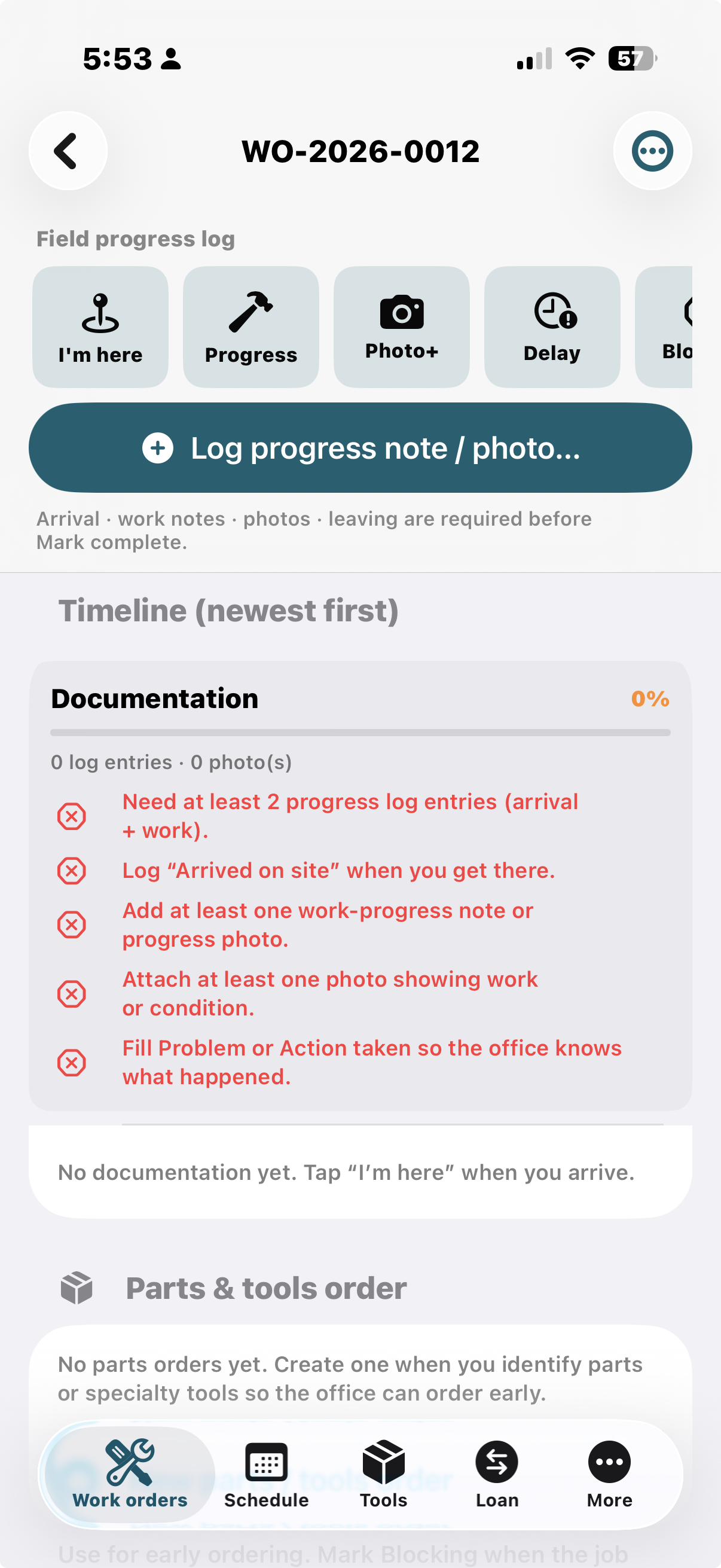
The field screen does not just track a job — it blocks Mark complete until arrival, progress, photos, and problem/action notes exist. That checklist is your pass/fail filter for new employees and contractors.
Candidate vs fail
Candidate
- On-time (or honest delay) I’m here
- Photos + progress notes; score rises
- Problem / action taken filled
- Field return same day when asked
- Does not fight documentation gates
Keep them on more free-tier tickets — or hire.
Fail
- No arrival stamp; empty timeline
- Zero photos; “I finished” by text only
- Argues that gates are “too much paperwork”
- Silence at end of day; no field return
- Pushes you to force-complete every job
Do not hire — or stop retaining them.
This is not a personality quiz. It is one real job with the same gates your warranty, claim, and customer-facing work will require.
Instead of hiring first and hoping
Hope path
- Verbal “meet me at the yard at 8”
- Hoping they text photos later
- Learning they ghost after a payroll week
Trial path
- Share a
work-order packagewith appointment, slip, expectations - App requires arrival, progress, photos before complete
- Learn it on ticket one — free tier
Candidates install from the App Store. First 12 work orders free — enough for a serious trial without buying seats or cloud licenses.
What you learn in one day
| Signal | Verdict leaning |
|---|---|
| On-time I’m here + clear photos | Candidate — reliable field habits |
| Delay / Blocked with honest notes | Candidate — professional under friction |
| No arrival stamp, no photos, vague texts only | Fail — high risk of ghosting customers |
| Field return same day | Candidate — understands the office paper trail |
| Argues with gates / skips docs | Fail — will fight process on every claim or warranty job |
Manager setup — one real ticket
- Pick a real service call (not a fake training dummy if you can avoid it).
- Schedule → Assign (or Jobs +) — who, site/unit, address, appointment window.
- Problem summary + one line of culture, e.g. “Tap I’m here when you arrive, photo the equipment, dictate what you found, Leave and complete before you text me.”
- Share work order → Messages / AirDrop / Mail — the
work-order packagefile. - They install ServiceTech (free tier is enough for the trial).
The file carries structure. Your short note carries culture.
Worker day — following instructions (iPhone)
This is the path a solid contractor or new employee walks. If they cannot complete it, they are not protecting your reputation on the job site.
- Worker receives assignment on iPhone or Android.
- Tap the attachment in Messages / Mail / Files.
- Open in ServiceTech (or ServiceValet — document type registered).
- Or: Transfer → Import work order file.
- Job appears in Jobs → Created (or updates if same id).
- I’m here (or Start job) → logs arrival with timestamp.
- During the day: Progress / Photo+ / Delay / Blocked one-tap log entries (note + photo).
- Documentation score and blockers prevent Mark complete until minimum docs exist.
- Leaving → then complete; add cost lines as needed.
- Transfer → field return package back to the manager (end of day).
Managers import the return; timeline, authors, timestamps, and photos merge into the firm record.
Why documentation gates matter
Nobody can claim “done” without a minimum paper trail — that is the whole point of the vetting process.
| Action | What it records |
|---|---|
| I’m here | Arrival time + optional note; starts job if needed |
| Progress | What you did + optional photo + % complete |
| Photo+ | Required photo with caption |
| Delay | Why late / waiting |
| Blocked | Waiting on parts, customer, or access |
| Leaving | Departure stamp |
| Mark complete | Blocked until: arrival, progress/photo, ≥1 photo, leave/complete note, problem or action taken |
Reading the red list (from the screenshot)
- Need at least 2 progress log entries (arrival + work)
- Log “Arrived on site” when they get there
- Add at least one work-progress note or progress photo
- Attach at least one photo showing work or condition
- Fill Problem or Action taken so the office knows what happened
A candidate clears these without drama. A fail stalls, texts outside the system, or asks you to turn the gates off. Managers can Force complete with a stamped confirmation when the business truly needs an override — repeated force-complete is itself a signal.
Cost framing — hire, retain, or cut
Weeks of pay, van, customer damage, reputation — before you know how they work.
Ongoing payroll with weak documentation and rework — often worse than never hiring.
One free-tier ticket. Arrival stamps, photos, docs score, field return — evidence before payroll or a permanent seat.
After free tier, list pricing is $19.99 / month or $199.99 / year — far less than one claim-admin day, and far less than one bad hire you keep on the schedule.
Privacy that sells the handoff
No cloud login for the contractor. The file is the interface. You choose who gets the package. Data stays on devices unless someone shares an export.
Related
- User workflows — interactive flowcharts (contractor trial modal)
- Distribution — iPad office vs iPhone field
- Marketing home — full product positioning
- Features — product capabilities
- Marine sibling: MarineServiceTech contractor trial (same idea, marina / yard)